
This post continues our preview series of MindManager 8 for Mac which is gearing up to launch in November.
We’ve added a new way to quickly navigate your maps using standard Apple gestures on MacBook trackpads.
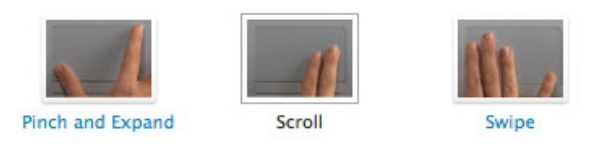
Pinch & Expand: This gesture is generally achieved with the thumb and index finger. Use it to change the zoom magnification of your maps. “Pinching” will zoom out and “expanding” will zoom in.
Scroll: Use two fingers to drag across the trackpad to scroll your map.
Swipe: This is a three figure gesture in any of the four cardinal directions (up, down, left, right). These gestures scroll the map one “page” at a time.
Stay tuned for more updates over the next couple of weeks…
For more posts in this series:
- MindManager Mac Special
(Get MindManager 8 for Mac free when you purchase MindManager 7 for Mac) - MindManager 8 for Mac + Mindjet Player = Maps for Everyone!
- Share Your Genius with MindManager 8 for Mac
- MindManager 8 for Mac: Address Book Integration
- MindManager 8 for Mac – iCal Integration
- MindManager 8 for Mac is Coming!



#1 by Michael Deutch at November 3rd, 2009
| Quote
HMM, I think I was confused by your terminology, topic styles. Topic styles are a very specific feature in MindManager 8 for Windows. It sounds like you’re referring to something else (e.g. custom properties). Regardless, if something isn’t working, I encourage you to report this to our technical support team here: http://www.mindjet.com/support/contact/overview
Thanks!
#2 by HMM at November 3rd, 2009
| Quote
I already have lots of maps in which the topic style functionalty is used. (I haved used the functionality since MM7 for windows… for hundreds of maps) Is there any solution that the maps can be seen in Mac?
#3 by Michael Deutch at November 2nd, 2009
| Quote
HMM, just checked. You’ll have the ability to set default styles for levels in the map but not ‘topic’ styles that can be applied individually. You can use the ‘copy and paste format’ feature in the edit menu. That will let you quickly copy topic format (share & font style) and apply it to other topics.
#4 by HMM at November 2nd, 2009
| Quote
Does it have topic stype functionaity?
#5 by Michael Deutch at October 21st, 2009
| Quote
Andrew, if you’re referring to the ’share’ capability updated in MindManager 8.1 for Windows, then the answer is YES. If you’re referring to the ability to export to the ‘Mindjet Player’ format, the answer is also YES.
#6 by Andrew at October 20th, 2009
| Quote
Will the new version allow us to publish live linked mindmaps to the web as I understand is possible with the current version of mindmanager for windows?
#7 by Michael Deutch at October 20th, 2009
| Quote
Justin, good question. As it isn’t out yet, it isn’t likely to be officially supported. We can cross that bridge when apple releases their magical mouse
#8 by Justin at October 20th, 2009
| Quote
Cool! I plan to purchase the Magic Mouse from Apple when it is available… will the multitouch gesture support work with Magic Mouse? I’m not sure if it’s a simple matter to port the work done with trackpads to other input devices.