

We’re excited to announce the official iPhone™ and iPod™ touch app from Mindjet!
Mindjet for iPhone (& iPod touch) works with MindManager for PC, Mac, and Web providing access to your maps everywhere you go. It’s fast and easy to use!
Check out the highlights…
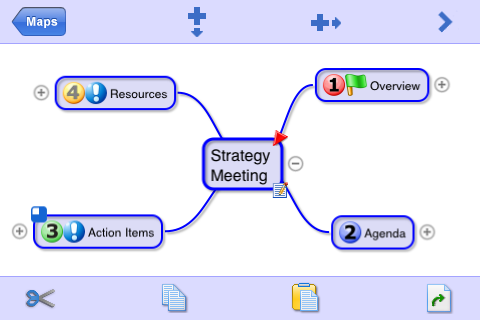
- Expand and collapse topics
- Cut, copy, past, move and merge topics
- Add icons and change topic colors
- Format topic shapes
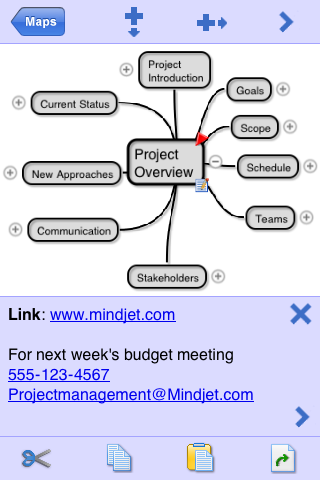
- Attach topic notes
- Align and arrange topics
- Zoom and scroll in both landscape and portrait modes
- Use as a stand-alone app or upload & download maps from MindManager Mac, Windows, or Web.
- Email maps as attachments
- Build maps in any iPhone supported language
Buy Mindjet for iPhone in the iTunes Store
Create Maps in Landscape Mode:
Create Maps in Portrait Mode (Topic Notes Displayed):
See It In Action:
Purchase Mindjet for iPhone at the iTunes Store
Get productive and have fun mapping on the go!
About the Author:
Michael Deutch is Mindjet’s Chief Evangelist, content contributor for the Mindjet Blog and the Mindjet Connections newsletter. Get more from Michael on Twitter.



#1 by iphone application developer at October 14th, 2009
| Quote
Looking promising. Will surely check it soon. Thanks for sharing
#2 by Sean DSouza at October 7th, 2009
| Quote
Also I noticed you use BonJour. How do I turn that on for my Mac?
#3 by Sean DSouza at October 7th, 2009
| Quote
I found the video very useful.
It changed my perception of how to use it on the iPhone. What wasn’t clear was the xmmap function though. Would I need to change all my files to xmmap to upload them to my iPhone?
#4 by odm at October 1st, 2009
| Quote
is there a free or VERY low cost upgrade plan for Ithoughts registered users ?
because I would be glad to get the benefits of the Mindjet integration as a mindmanager user for years but would find EXTREMELY UNCOMMERCIAL to charge twice the price for the same product
#5 by David at September 30th, 2009
| Quote
I’m not sure all I’ll end up using mobile mapping for, but so far I use it for:
- Notes in meetings. I create a new map and tap in all the notes. I then email the map to my work email so I have a backup. I have to show everyone in the room what’s on the screen so they don’t think I’m texting people.
- High level planning, organization. So: personal mind-mapping. Especially when I’m on a plane and have a lousy seat so have no room to open my laptop
- Reference maps. I download 4 or 5 maps that have all the stuff going on for my major tasks. I don’t update those, but just use them for random information queries.
#6 by Michael Deutch at September 28th, 2009
| Quote
Thanks all. How are you planning to use your mobile mapping? Create maps on the go or use it primarily for reference?
#7 by Jocelyn at September 25th, 2009
| Quote
This looks very promising to me – I’ve tried several iPhone mindmapping tools and don’t like or use any of them. It’s too time-consuming to build a map on an iPhone. I imagine most MM power users would find it frustrating. But what I REALLY want to be able to do is create maps on my PC and download them to the iPhone. That would keep me on top of projects, tasks, research, etc. that I store and track in maps, and make them portable, accessible, and editable on the road. Looking forward to trying this!
Jocelyn
#8 by geonista at September 24th, 2009
| Quote
Right on MindJet! I been using iBlueSky and is ok but MM is superior and as a long time user from v5 to v8 I am so happy to pay the$8.00, with this app MindJet scored a 10! awesome.
#9 by Andrew at September 23rd, 2009
| Quote
The Transfer page is definitely iThoughts. Kind of a bummer – since I had purchased iThoughts the week before – and unless they changed the price, iThoughts is $3 cheaper.
Thomas – you can purchase apps right over your iPhone.
#10 by Administrator at September 22nd, 2009
| Quote
Thomas, the price is $7.99. Yes, Apple controls the store so there isn’t much we can do to simplify that process for you. Sorry!
#11 by Craig at September 22nd, 2009
| Quote
Wow! Just finished watching the video. I love this! Next to my computer, my iPhone is my most used (and useful) business tool. I can’t wait to download this and put it through its paces. I can imagine what I can do with it planning my next seminar presentation or brainstorming a client’s web site structure on the fly. I’m excited!
#12 by thomas at September 22nd, 2009
| Quote
Seems ok, but what is the price?
I can’t download & install iTunes because of no admin rights. I may be wrong (hope I am!) or stupid (hopefully not…) but there seems to be too much of a hazzle to buy anything online from Apple.
#13 by Michael Deutch at September 21st, 2009
| Quote
Here are the instructions to transfer files between your desktop and iPhone / iPod touch:
http://blog.mindjet.com/2009/09/transfer-mindjet-for-iphone-ipod-touch-with-mindmanager-windows-mac
#14 by Steve Rubel at September 19th, 2009
| Quote
I am confused too – seems like a virtual clone of iThoughts, minus a few features. Did Mindjet license iThoughts to do a co-brand? If not the UI is so close it made my head spin. It’s all very confusing for the consumer.
#15 by Erik Spitzner at September 18th, 2009
| Quote
This is iThoughts. No question about it. Best mind-mapping app for the iPhone. Been using it for about a year now.
#16 by David at September 18th, 2009
| Quote
This does look like iThoughts… which is a great move from mindjet from my point of view! I’m very, very happy with iThoughts and mindjet building on that makes me optimistic about the future of mind manager and mind mapping on the iPhone!
My only question is whether the products will now go different directions and thus (since I’m a mind manager guy) will I have to buy a copy of this app to get the cooler integration that I hope will be coming between mind manager on the iPhone and Desktop.
#17 by Stellan at September 18th, 2009
| Quote
that´s exactly the same as Ithoughts..?
#18 by Michael Deutch at September 18th, 2009
| Quote
Karen, Jens is correct.
Andrew, you question is covered in the guide posted here: http://blog.mindjet.com/2009/09/mindjet-for-iphone-questions-and-answers
#19 by Jens Hoffmann at September 18th, 2009
| Quote
@Karen Hughes:
To transfer a mindmap from MindManager 7 Mac to Mindjet for iPhone you have so save it in MindManager Mac manually with an extension .xmmap. This seems to be an hidden feature.
Then you can upload it.
#20 by Karen Hughes at September 18th, 2009
| Quote
What is the best way to transfer files to the Mac version of MindManager? The only one that seems to work for me is OPML, which loses a lot of the information. MindManager for Mac doesn’t seem to be capable of saving files in any of the formats required by the iPhone version.
#21 by Andrew Wilcox at September 18th, 2009
| Quote
What issues / limits are there with importing “complex” maps from PC versions of MindManager?
#22 by Andrew Wilcox at September 17th, 2009
| Quote
The iPhone links take me to the home page not the MindManager for iPhone page
#23 by Patrick at September 17th, 2009
| Quote
Looks suspiciously like a MindJet branded version of iThoughts.
Interesting product name, wonder when MindManager for iPhone is coming then.